You can draw in any AppleWorks document type. However, sometimes it is better to start with a drawing document, and sometimes it is better to paint instead of draw.
In a drawing document, you work with objects. An object can be a shape, line, or curve that you create with the drawing tools. Objects can also include items such as clip art, photographs, movies, or sounds. Working with drawing documents is like creating a collage, with objects that you can easily position, layer, and rearrange.
When to draw instead of paint
Drawing is better than painting when:
•
You want to rearrange layers of objects (in a painting, you cannot move layered items forward or backward)
•
You want to draw shapes, lines and curves, and simple freehand objects (painting is better for more complex freehand images)
•
You want to easily reselect and manipulate objects (everything added to a painting becomes part of the overall canvas and is not as easily selected and manipulated)
•
You do not need to use painting-only features, such as blending colors, tinting, lightening, or darkening (you can add a painting frame to a drawing document if you need these effects in a portion of your document)
For more information, see "Differences Between Painting and Drawing in AppleWorks" in Chapter 2 of the "Getting Started With AppleWorks 6" manual.
Note: In database documents, you can draw only in Layout mode.
When to start with a drawing document
A drawing document is best for projects, such as newsletters, that include a mixture of text and graphics. You can add table, text, spreadsheet, or painting frames to a drawing document, and you can use the Arrange menu commands to position and layer frames, text, and graphics. Of course, a drawing document is also the best choice if you need only to draw objects in the document.
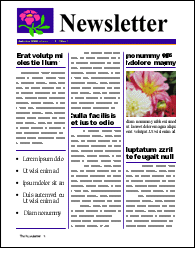
Example of a project created in a drawing document
Related topics
Adding and removing pages in a drawing document
Entering and editing text
Drawing shapes
Drawing straight lines, arcs, and curves
Drawing freehand objects
Painting images
Table of contents | Index